
Never Plug In Raw Again

We plug our phones into everything. Airport kiosks. Hotel lamps. Printers. Rental cars. Conference booths. Airplane USB ports. Strangers’ laptops. Smart desks.
USB charging has become completely normalized. And sometimes we don’t realize that what we’re plugging into is another computer.
USB connections are often doing two jobs at once: delivering power and opening a channel for data. And if you don’t control what you’re plugging into, that data connection might be used to steal information or load malware onto your device.
One thing that can help is a USB data blocker. It’s a cheap piece of hardware that is criminally overlooked.
In this newsletter I’ll talk about why you shouldn’t plug your phone into random USB ports, and I’ll explain how USB data blockers help and how they work.

Why You Shouldn’t Plug Into Unknown Ports
Let’s start by understanding the dangers of plugging your device into unknown USB ports.
1. Juice Jacking
First there’s juice jacking from malicious USB ports. A scammer puts malware or monitoring software into a public USB port that gives them the ability to steal data, passwords, addresses, and banking information off a phone when it plugs in.
2. Malicious Cables
Then there's the risk that the cable itself might be malicious. We've talked about things like the OMG cable on the show before: it looks identical to a normal cable, but it has a tiny computer and wifi access point hidden inside. An attacker can connect to it from anywhere in the world and run payloads on whatever it's plugged into.
So you should never plug in any charging cable that you find lying around.
3. Privacy
And finally, there’s the privacy side of plugging your phone into things. What you’re plugging into might not be malicious, but you could be unintentionally sharing data without realizing.
Cars are a great example of this. When you connect your phone to your car, oftentimes the car essentially downloads a mini clone of your phone.
Many people think that this doesn’t matter, because they assume their own car is private and neutral, and that any USB connection to it is safe because it is “their” vehicle.
But cars are packed with connected services and third-party integrations. This data isn’t staying in your car. It’s shared with countless entities. There’s an entire explosion of data collection in cars. And the worst part of it is that we have no idea who will get access to this data. Car companies, ad companies, hackers through data breaches, and of course massive data brokers that collect data from all sorts of manufacturers and they sell it.
Sometimes you might just want to charge your phone in your car without sharing your phone data with countless 3rd parties.
Risk of Unintended Data Transfer
Now how likely is it to fall victim to one of these dangers mentioned?
A malicious USB port does not usually get instant access just because you plugged in. A few things are required, and there are some protections built into your phone.
First, Android has something called “USB protection” which can block USB data while locked. And by default, iPhones and iPads enter a protective state called USB Restricted Mode: if the device has been locked for more than an hour, it won’t communicate with an accessory or computer until you unlock it, though it will still charge normally from a USB power adapter.
But you don’t always keep your phone locked when it’s charging, so these charge-only modes won’t necessarily protect you.
Next, on Android and GrapheneOS you can change your security settings so that you only ever allow charging through the USB port and not data. But this setting will have to be shifted back if you ever want to connect the device to your computer or speaker etcetera.
Then there are trust prompt protections. For example, often, to enable data transfer you have to approve some kind of popup. Some of these might auto-appear in a way that’s easy to tap accidentally, or approve while you are half awake in an airport, for example.
But sometimes consent can actually get bypassed. There are cases where your phone might automatically say yes without you even having to tap anything. For example, if you’ve previously trusted a computer, your phone might remember and not ask again. So a malicious device can potentially impersonate a trusted device and auto-connect.
Finally, if your phone is running outdated software, the chances of being successfully attacked by a malicious USB port goes up significantly.
These risks end up being non-trivial, but luckily there is an easy way to protect against all of them at the hardware level, before the phone even has a chance to negotiate a data connection.
You just need a USB data blocker.
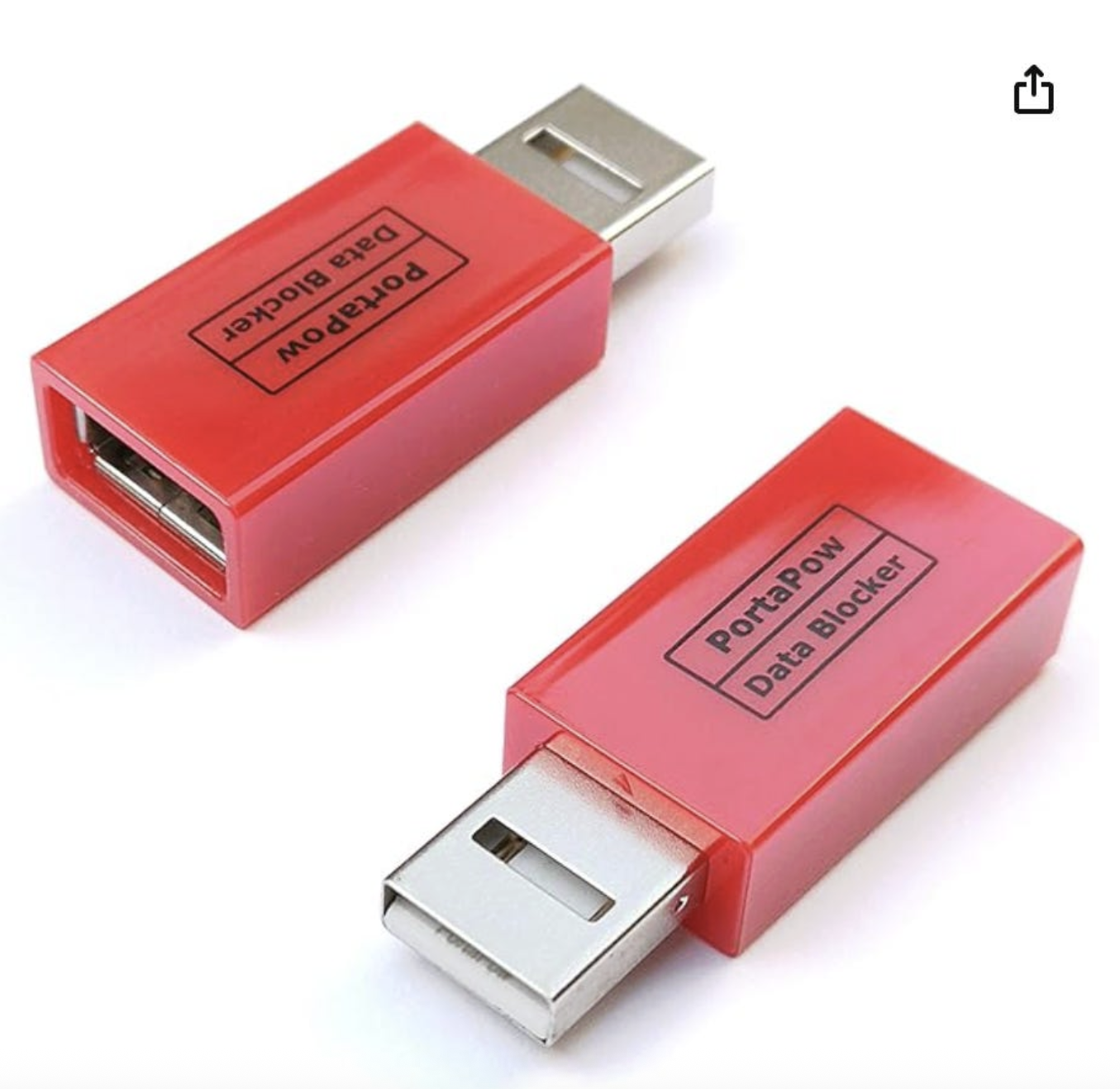
What Is A USB Data Blocker?
It has many names, like a “charge-only” adapter, or juice-jack defender. Or more risqué names like USB condom.
It’s a small adapter that sits between your device and whatever you’re plugging it into. If you want to charge your device, you could plug the blocker into your device, then plug your charging cable into the blocker.
What is the point of this? Using a USB blocker blocks the flow of any data and allows only electrical power through.
How Does It Work?
It’s all done through the physical pins inside the USB port itself.
Let’s start with a USB-A, which is the square-shaped USB that always seems to go in the wrong way the first 2 tries.
If you cut open a USB-A cable and peel back the outer plastic jacket, you’d find that it isn’t just one solid wire inside. It’s actually four thin wires bundled together, each wrapped in its own colored insulation. Each of those four wires has a specific job, and they fall into two categories: two of them carry electricity, and two of them carry data.
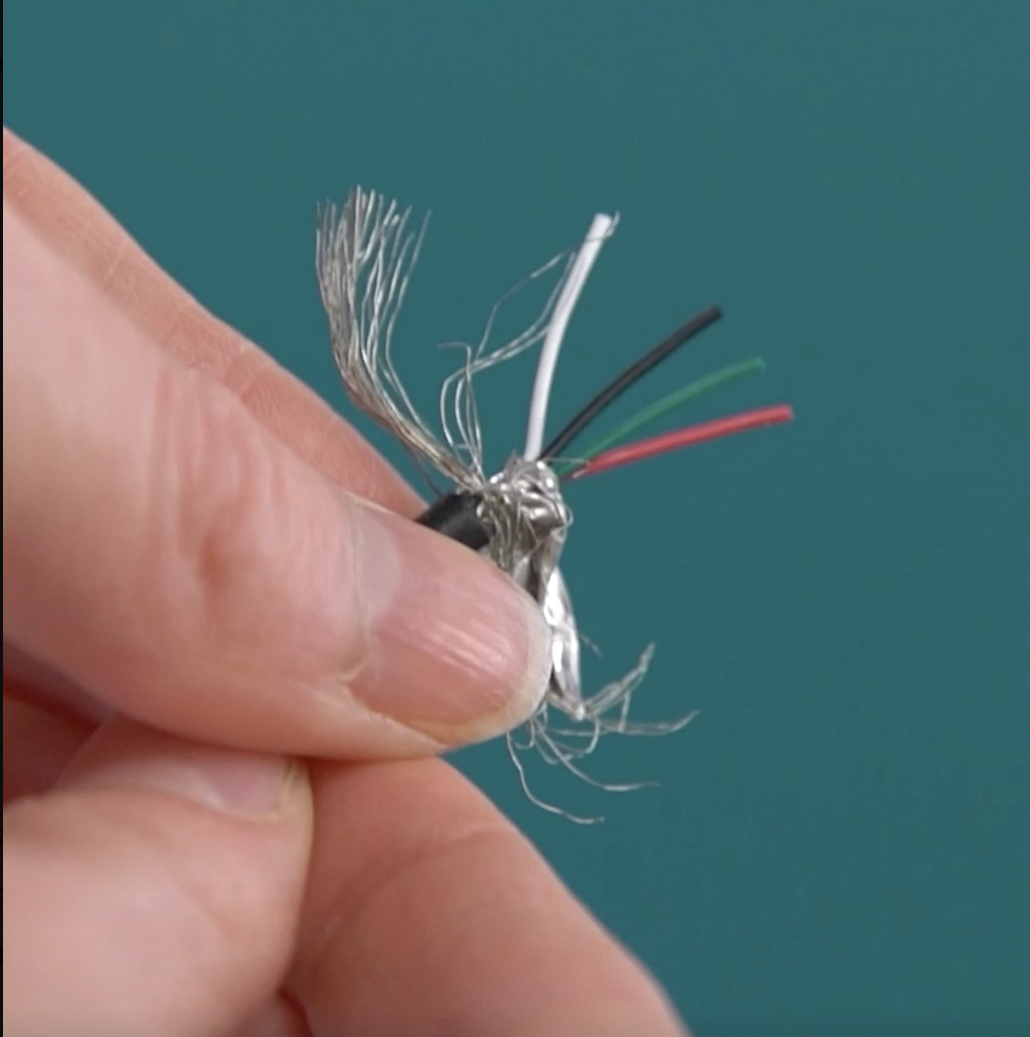
One wire is called voltage positive and one wire is called ground. Electricity needs a complete loop to flow, so the V positive wire delivers the electricity, and the ground wire gives that electricity a path to return. Together, these two wires make charging possible.
The other two wires are the data wires, “D plus” and “D minus.” These don’t carry power, they carry information. When your phone sends a photo to your computer through a USB-A cable, that photo is actually being chopped up into millions of tiny electrical pulses, and those pulses travel along the D+ and D- wires from the phone to the computer.
And if you look inside a USB-A port, you’ll see four metal pins — one for each of the four wires inside the cable.
If you look inside a USB-A data blocker, you’ll see only 2 pins, because it’s physically severing the connection of the two data pins, while keeping the power pins intact. This means that electricity flows freely, but no data flows.
Now this is just for USB-A. USB-C cables are much more complex internally — they have many more wires inside the cable, and 24 pins in the connector, to support things like faster charging, video output, and reversible plug orientation. But the basic principle of separating power pathways from data pathways still applies.
Unfortunately, unlike with USB-A, you can’t visually verify what’s being cut off with a USB-C data blocker, because the internal wiring isn’t inspectable by eye and the pin count makes it non-obvious what’s connected to what. So with USB-C you largely have to trust the manufacturer’s claims.
This is a good reason to buy USB-C blockers from reputable brands with clear technical documentation, rather than no-name products (I personally use PortaPow).
It’s also worth noting that cheaper USB-C data blockers may not support fast charging protocols and may limit you to standard 5-volt charging speeds.
The Bottom Line
Remember, you’ll only want to use a data blocker when you just want to charge your device. Using one means giving up legitimate USB functions like photo transfers, Android Auto, tethering etc. A blocker will interfere with all of that data communication. But that’s the point.
But when you just want to charge, a blocker gives you a simple assurance that only power is crossing the connection.
For a fully updated, locked phone, plugging into a malicious USB port is fairly low-risk. You’d likely need to actively grant trust, or the attacker would need a real vulnerability. And compared to threats like phishing, it’s less to worry about.
But why worry at all?
Relying on being perfectly patched and attentive at all times is a bad strategy. Especially when you can instead just block the data path and move on. And especially when it costs less than a cup of coffee, and does the job so well.
Yours In Privacy,
Naomi
Consider supporting our nonprofit so that we can fund more research into the surveillance baked into our everyday tech. We want to educate as many people as possible about what’s going on, and help write a better future. Visit LudlowInstitute.org/donate to set up a monthly, tax-deductible donation.
NBTV. Because Privacy Matters.